Apex Terminal

One connection. Your shell, your files, your desktop, your tunnels.

Apex Terminal is an SSH client for iPhone and iPad. One connection carries your shell, your files, your desktop and your tunnels — one handshake, one authentication, one biometric prompt. Keys can be generated inside the Secure Enclave, where the private half cannot leave. No account, no back end, nothing measured.

Apex Terminal is not on the App Store yet. This page will carry the link when it is.

Free. iPhone and iPad, iOS and iPadOS 17 and later. Commands run on your own servers.

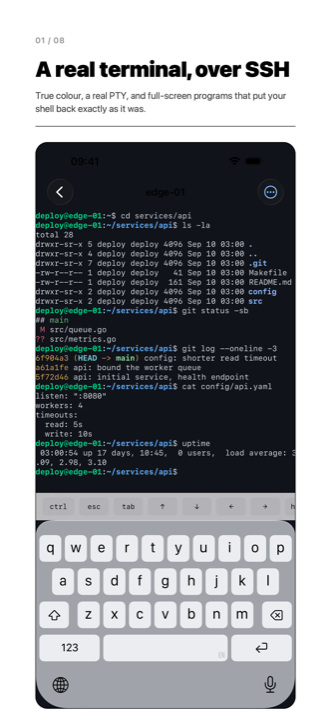
An iPhone showing a terminal session over SSH: a shell prompt, coloured ls output, and a running program redrawing the screen.

One connection, not four

Open a shell, a file browser, a remote desktop and a port forward on the same server and you pay for one TCP connection, one key exchange, one authentication and one biometric prompt. They are channels on a single pooled SSH transport, not four separate logins.
A key that cannot leave the phone

A key generated in the Secure Enclave has no private half outside the chip. There is no key file, so there is nothing to export, back up or steal — and it logs in to an ordinary, unmodified OpenSSH server.

A terminal you can work in

True colour, sixel pictures, mouse reporting, an alternate screen that puts your shell back exactly as it was, and cell widths taken from the Unicode tables so text lines up in the grid. The file browser, the tmux client and the remote desktop are built the same way.

Four things on one server cost one TCP connection, one key exchange, one authentication and one biometric prompt. The count in that sentence is not the app's own report of itself — it is taken from the server's log, by a test that opens four channel types against a real sshd and reads back how many times it authenticated.

The terminal

Your programs draw what they meant to draw: 24-bit colour and 256 colours, the alternate screen, sixel pictures, mouse reporting in three modes, reflow on a width change, and search across the whole scrollback.

Files

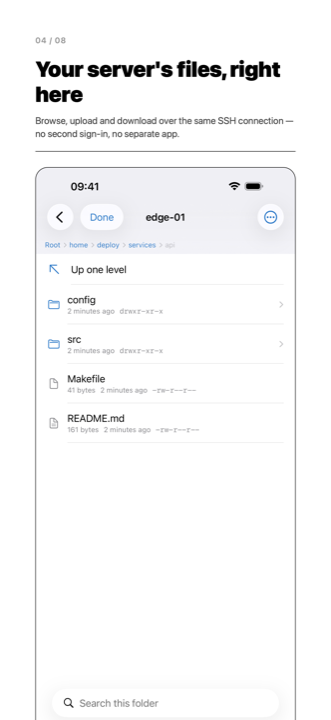
Browse your server over SFTP on the same SSH connection as your shell. Upload, download, rename, make folders, set permissions, and keep several remote folders open at once.

The file browser listing a remote directory over SFTP.

Port forwarding

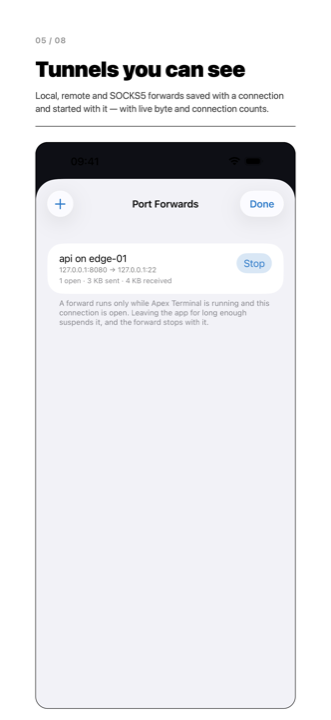
Local, remote and dynamic SOCKS5 rules, saved with a connection and started with it. Each rule shows bytes out, bytes in, how many connections are open now and how many it has carried.

A list of port forwarding rules, each showing bytes moved and connections carried.

tmux

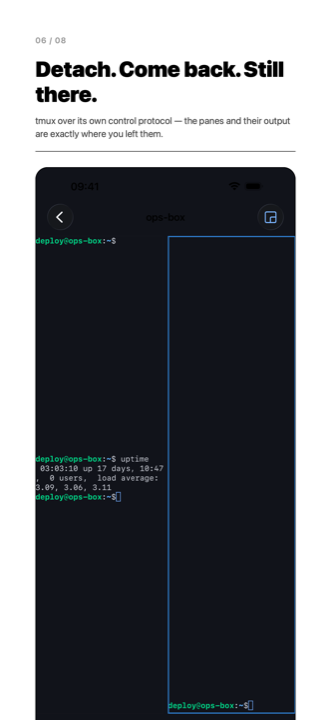
Apex Terminal speaks tmux's own control protocol, so the panes on screen are tmux's arrangement rather than text scraped off a screen. Detach, put the iPad down, attach again.

A tmux session with its windows listed and its panes drawn as tmux arranged them.

Remote desktop

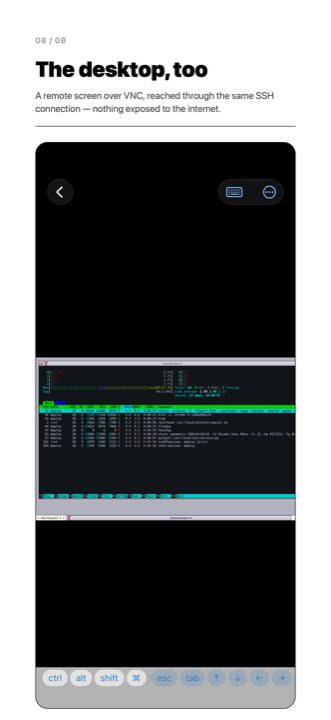
A machine's screen in the same app as your terminals, travelling inside your SSH connection, so nothing has to be exposed to the internet.

A remote desktop drawn over VNC inside the app.

On iPad

Split a pane and watch a log while you work. Each pane is a full session with its own toolbar, and a session can be opened in a second window beside another app.

Security and keys

Secure Enclave keys, OpenSSH certificates, ProxyJump through a bastion, agent forwarding with the device acting as the agent, and a changed host key that stops the connection instead of asking you to tap through.

Free

Apex Terminal is free. There is no in-app purchase, no subscription, no trial that ends, no tier that unlocks a feature, and no account to create. There is no purchasing code in the app at all: no StoreKit, no in-app-purchase symbol, nothing to buy anywhere in the build.

You supply the servers. The app connects to them.

Free, and there is nothing else to it

No account to create, nothing to buy, and no back end operated by us. You supply the servers; the app connects to them.

Apex Terminal is not on the App Store yet. This page will carry the link when it is.